
Resetting/Recovering, Master password on Firefox
FireFox is an open-source application given by Mozilla Corporation to their user for free use. It is basically an internet browsing application or I could say “web browser” in short. By the way, I don’t want to explain about firefox as you all may know more than me. ; )
Therefore, I’ll start explaining on what I wanted to write here.. Well, this is actually a known issue for all Firefox addicted users. It is all about resetting the master password by loosing all available DATA’s or recovering it without loosing any of the DATA’s. By DATA which I meant is the stored usernames & passwords within Firefox.
What is Master password & How to use/enable it;
Master password is an inbuilt feature available in Firefox. It actually enables more security to other saved usernames & passwords with one master password. But, by default; Firefox does not use master passwords to protect stored credentials. It can be enabled by following steps explained thoroughly here or at our GeekLK post here.
Resetting when you forgot the Master password
Note: This process will remove all of your saved usernames and passwords. Therefore, if you don’t have any important DATA’s you may easily use this process or else try the recovering method.
1. Open Firefox; enter the below given one, within the address bar & press ENTER.
chrome://pippki/content/resetpassword.xul
2. Thereafter, you’ll see a dialog-box likewise mentioning to “reset” & to “cancel”.
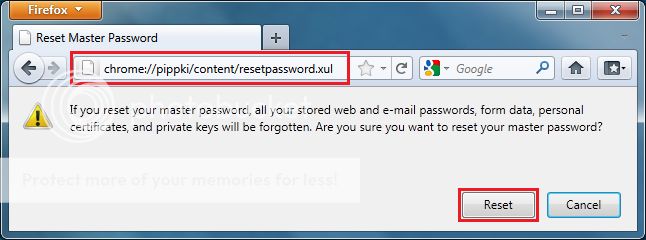
3. Simply hit on “Reset” button to get it done.
Recovering when you forgot the Master password
One of the secured way of protecting our saved password is using Master password on Firefox. But, what if you loose or forgot your Master password. Well, the important part is that you must be lucky because, no one can access any of your saved credentials without knowing the Master password. And that’s where the FireMaster, the firefox master password recovery tool plays the major role. Well, actually I’ve never tested this, but for most they says that it worked. For the moment, I’m trying to capture a video on this and later I’ll try to edit & post it here… But, for now you may refer the below methods if you wanted to give a try.
Complete Tutorial on Firmaster: Click here
How-To Tutorial on LifeHacker: Click here
Control your Android device from a Web browser with Airdroid
Importing & Exporting large scaled Databases using MySQL dumper

An IT professional living far away from the pearl of Indian ocean. A Telecom nomad moved towards networking & hospitality IT building elegant resort in the romantic island of Maldives. An open-source fanatic, a geek and yes! a minion fan. I prefer football & popcorn ^_^